Showing posts with label Tech Burger. Show all posts

Saturday, 9 July 2016

List of 59 Most Commonly Used Technical Abbreviations and Acronyms


Shashwat Doshi | Below is the list of  59 most commonly used technical abbreviations and acronyms used in our daily routine with their full forms. These should help you cracking some of the most commonly asked technical  interview questions or a college viva where full forms of these words are asked so often. So let us start enlightening ourselves,

1.) GOOGLE - Global Organization Of Oriented Group Language Of Earth.
2.) YAHOO - Yet Another Hierarchical Officious Oracle.
3.) WINDOW - Wide Interactive Network Development for Office work Solution.
4.) COMPUTER - Common Oriented Machine Particularly United and used under Technical and Educational Research.
5.) VIRUS - Vital Information Resources Under Siege.
6.) UMTS - Universal Mobile Telecommunicati ons System.
7.) AMOLED - Active-matrix organic light-emitting diode.
8.) OLED - Organic light-emitting diode.
9.) IMEI - International Mobile Equipment Identity.
10.) ESN - Electronic Serial Number.
11.) UPS - Uninterruptible power supply.
12. HDMI - High-Definition Multimedia Interface.
13.) VPN - Virtual private network.
14.) APN - Access Point Name.
15.) SIM - Subscriber Identity Module.
16.) LED - Light emitting diode.
17.) DLNA - Digital Living Network Alliance.
18.) RAM - Random access memory.
19.) ROM - Read only memory.
20.) VGA - Video Graphics Array.
21.) QVGA - Quarter Video Graphics Array.
22.) WVGA - Wide video graphics array.
23.) WXGA - Widescreen Extended Graphics Array.
24.) USB - Universal serial Bus.
25.) WLAN - Wireless Local Area Network.
26.) PPI - Pixels Per Inch.
27.) LCD - Liquid Crystal Display.
28.) HSDPA - High speed down-link packet access.
29.) HSUPA - High-Speed Uplink Packet Access.
30.) HSPA - High Speed Packet Access.
31.) GPRS - General Packet Radio Service.
32.) EDGE - Enhanced Data Rates for Globa Evolution.
33.) NFC - Near field communication.
34.) OTG - On-the-go.
35.) S-LCD - Super Liquid Crystal Display.
36.) O.S - Operating system.
37.) SNS - Social network service.
38.) H.S - HOTSPOT.
39.) P.O.I - Point of interest.
40.) GPS - Global Positioning System.
41.) DVD - Digital Video Disk.
42.) DTP - Desk top publishing.
43.) DNSE - Digital natural sound engine.
44.) OVI - Ohio Video Intranet.
45.) CDMA - Code Division Multiple Access.
46.) WCDMA - Wide-band Code Division Multiple Access.
47.) GSM - Global System for Mobile Communications.
48.) WI-FI - Wireless Fidelity.
49.) DIVX - Digital internet video access.
50.) APK - Authenticated public key.
51.) J2ME - Java 2 micro edition.
52.) SIS - Installation source.
53.) DELL - Digital electronic link library.
54.) ACER - Acquisition Collaboration Experimentation Reflection.
55.) RSS - Really simple syndication.
56.) TFT - Thin film transistor.
57.) AMR- Adaptive Multi-Rate.
58.) MPEG - moving pictures experts group.
59.) IVRS - Interactive Voice Response System
This list is contributed by Shashwat Doshi.

Anything missed out ? If so, please do comment below. Hope you had fun!

Tuesday, 5 July 2016

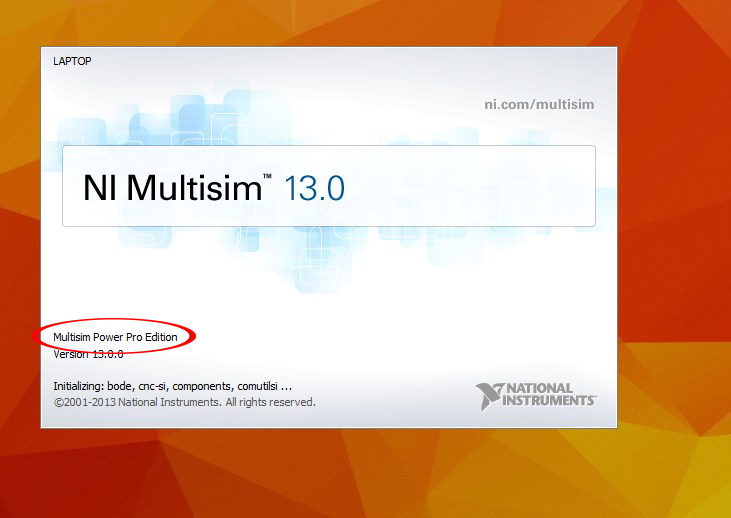
Multisim 13 full version with activator download

Multisim 13 full version with activator download


NI Multisim & Ultiboard

With powerful learning features and laboratory hardware integration, Multisim teaches students foundational concepts in analog, digital, and power electronics throughout engineering and science curriculum.
Multisim Student Edition to understand analog, digital, and power electronics in homework and projects. Multisim simulation and circuit design software gives engineers the advanced analysis and design capabilities to optimize performance, reduce design errors, and shorten time to prototype. Intuitive NI tools result in saved printed circuit board (PCB) iterations and significant cost savings.

Key Features of NI Multisim 13.0

    Complete Circuits Solution
    Teach Analog Circuits With Circuit Parameters
    Learn Digital Logic With Digilent FPGA Board Support
    Synchronize Schematic and Layout With Design Templates
    Automate Assessment With the Multisim API Toolkit
    Understand More Power Topics with Thermal Models
    Complete Senior Design Projects With NI myRIO Support
    Enhance Simulation with 26,000+ Accurate Devices
    Improve Design Performance With Circuit Parameters
    Simulate Power Circuits with IGBT Models and EPC Devices
    Download Custom Simulation Analyses
    Configure Automated Analyses With the Multisim API Toolkit
    Prototype Rapidly With User-Definable Templates

How to Activate License? ( Detailed Steps with screenshots)

 1. KEEP YOUR INTERNET CONNECTION CLOSED.
               
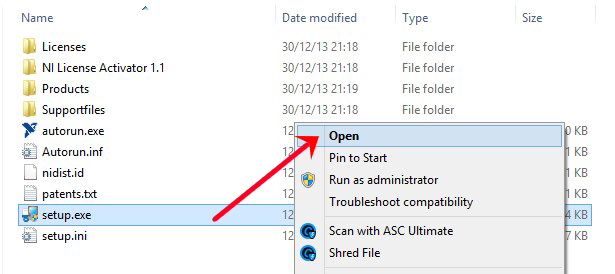
2. Extract the rar.package and open the setup file ‘’setup.exe’’.
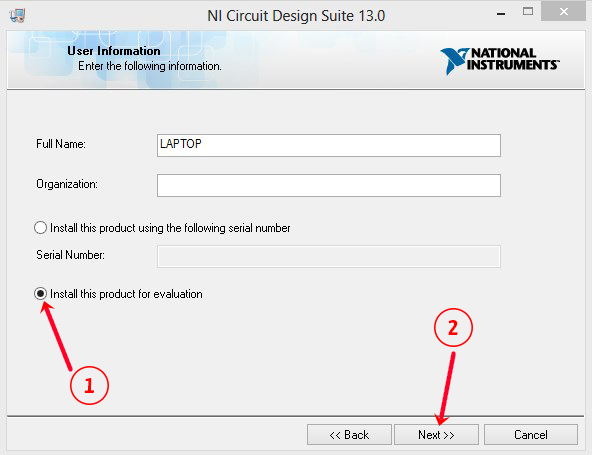
3. Select ‘’Install this product for evaluation’’ and click next.

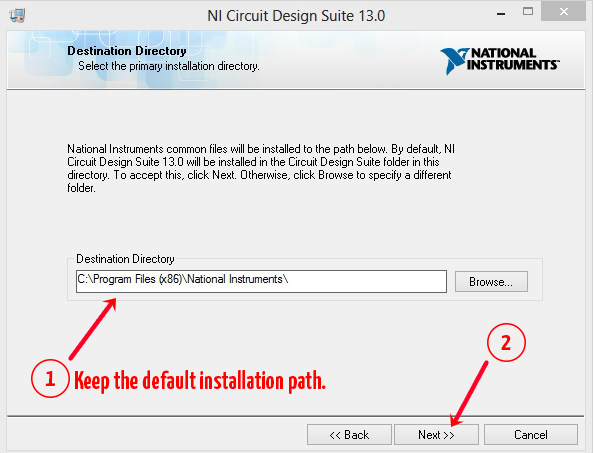
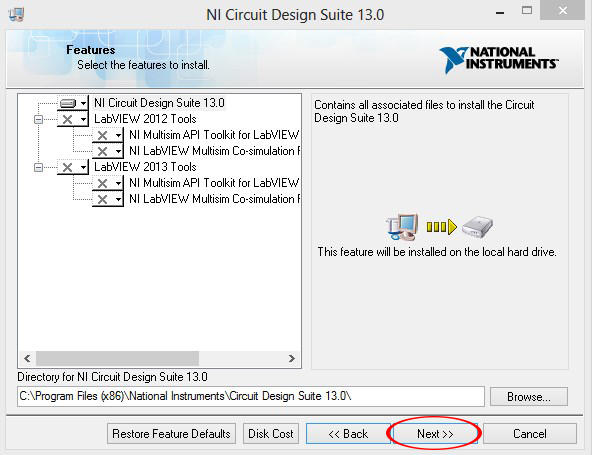
4. Keep the default installation path as it is and click next.

5. Click Next one more time.


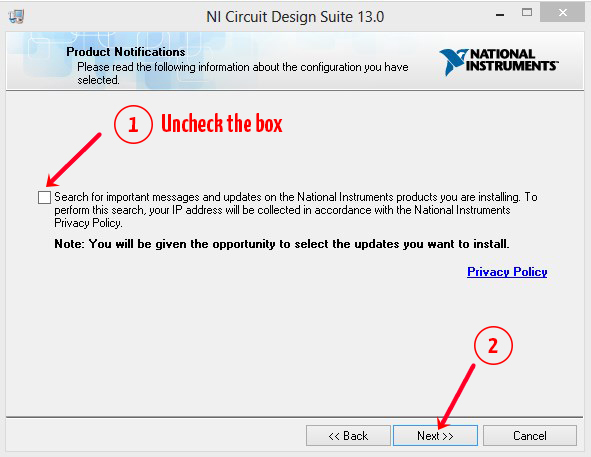
6. Uncheck the box and click next.
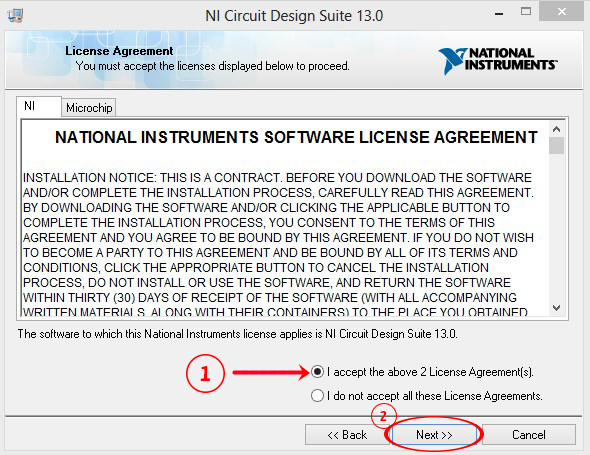
7.Select ‘’I accept…” and click next.
8. Click next.


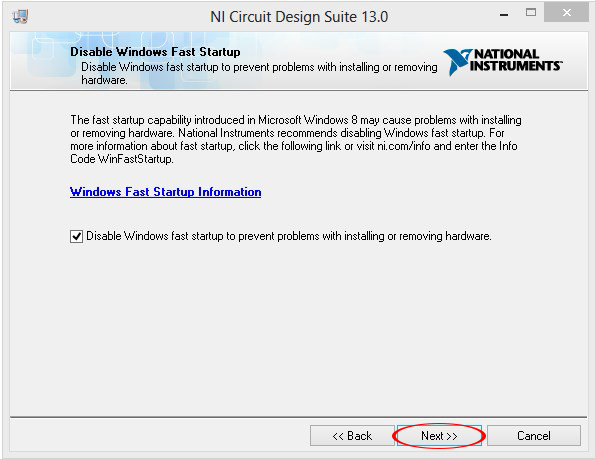
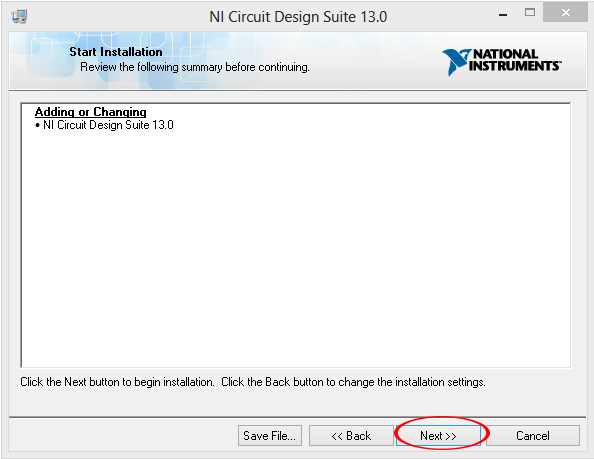
9. Click Next again. Installation will begin.


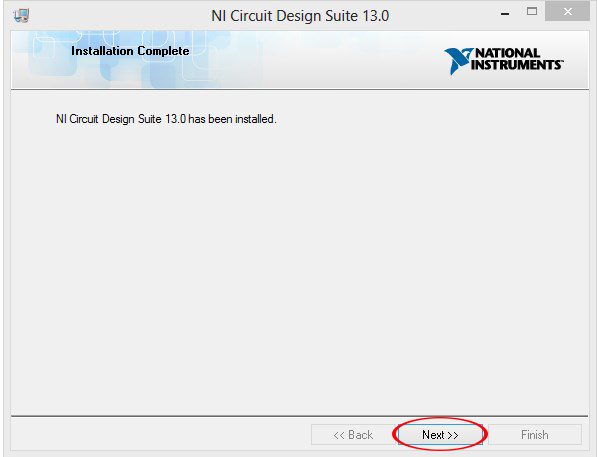
10. After installation, click next. Don’t open the software and restart your system.
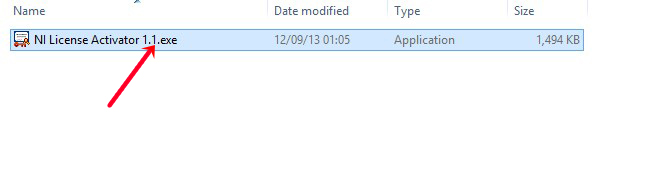
11. After restarting your system open the activator.
 
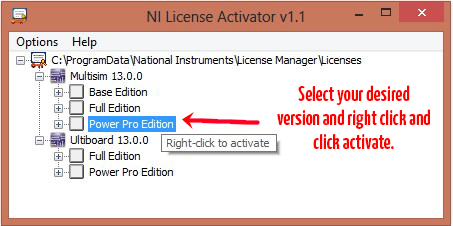
12. Select any of the three version of Multisim. Right click on it and click ‘’Activate’’.


13. Enjoy!


Download Multisim (664MB Rar file) - CLICK HERE

HOW to Save Webpage as PDF Using Google Chrome Browser in Android - (Offline Browsing)


HOW to Save Webpage as PDF Using Google Chrome Browser in Android - (Offline Browsing)

Jay | In this tutorial I will show you how to save a webpage on your android phone as PDF. file using Google Chrome browser so you can later view it without a internet connection. Follow the tutorial and it will be damn easy!


STEP 1 :

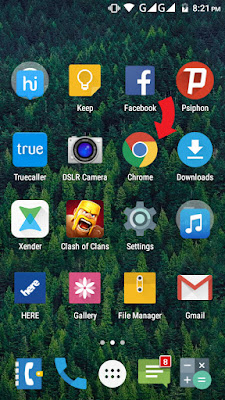
Open Google Chrome Browser on your android device.


STEP 2:

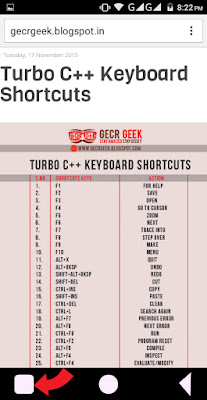
Navigate to any webpage that you want to save so you can browse offline. MAKE SURE page is fully loaded.

Now tap on the TAB button on your smart phone to open the list of options available to us. It is indicated by a 'red arrow' in the screenshot below. 


STEP 3:

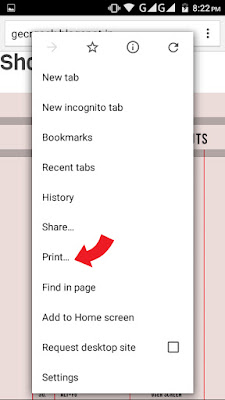
Tap on '' Print...'' in the new pop up box as show in the image below.


STEP 4:

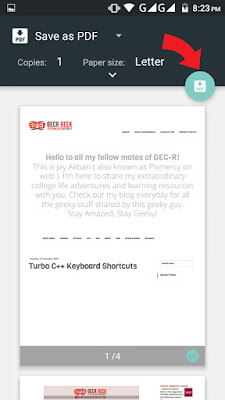
After completion of step 4 a new screen will appear as show below.  Make sure you have selected 'Save as PDF' if not.
Then click on the pdf icon indicated by red arrow in the image below.


STEP 5:

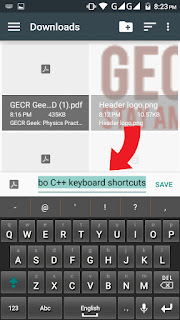
You will get an option as where to save your pdf. Select a suitable location on your phone. Give a new name to your Pdf if you want and lastly tap on SAVE. Check your download location and a sweet Pdf should be there.  Viola! You are done.

 
If you find any difficulty or have any suggestion, please mention in the comments below.

Monday, 4 July 2016

How Boost Your Computer's Speed & Performance using FLASH DRIVES | ReadyBoost


Hello everyone! This is Jay and in this post I am going to teach you how to speed up your PCs and laptops using flash drives like a Pendrive and it works brutally great. Everybody can do this. I mean, who doesn't have a Pendrive these days?! So let's head on to how to speed up your slow, lagging PCs and Laptops by just judiciously using the Flash Drives.

What is READY BOOST ?

ReadyBoost is a disk caching software component developed by Microsoft for Windows Vista and included in later versions of the Windows operating system. ReadyBoost enables NAND memory mass storage devices, including CompactFlash, SD cards, and USB flash drives, to be used as a write cache between a hard drive and random access memory in an effort to increase computing performance. ReadyBoost relies on the SuperFetch technology and, like SuperFetch, adjusts its cache based on user activity.

This feature uses external USB flash drives as a hard disk cache to improve disk read performance. Larger caches can improve performance, but the ReadyBoost cache cannot be greater than 4 GB on a FAT32 file system or greater than 32 GB on an NTFS file system. Windows 7 use the Windows SuperFetch algorithm to determine which files should be stored in the cache. SuperFetch monitors files that users access (including system files, application files, and documents) and pre-loads those files into the ReadyBoost cache.

Requirements

  1.  A removable media like flash drives(Pen Drives Micro SD Cards, Hard Disks,etc)

  2. For a device to be compatible and useful, it must conform to these requirements:
  • The removable media's capacity must be at least 256 MB (250 MB after formatting, Windows 7 reports in its Event Log a required minimum of 235 MB).
  • Windows 7 allows up to eight devices for a maximum of 256 GB of additional memory, with up to 32 GB on a single storage device.

Procedure

Follow the simple steps given below:
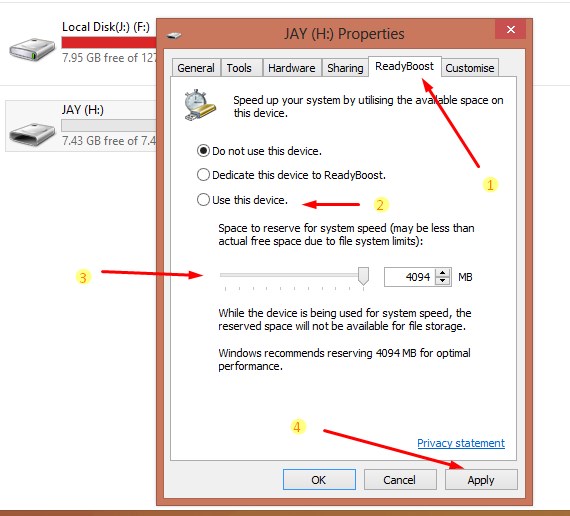
1. Insert your Pendrive/flash drive into your device and locate it by opening "My Computer".

2. Right Click on it and click on "Properties".

3. Select "ReadyBoost" tab on the top among the several tabs. 
4. Select "Use this device" and drag the holder to whatever size of  Readyboost cache you want to from. Choose the maximum(here 4094MB) for the best performance.

5.Click "Apply". That's it! 


Performance

 I daily use heavy applications like Photoshop, Illustrator, etc on my Laptop having 2GB RAM and Intel PENTIUM  2.10 GHz processor with Hard Drives almost full and sadly speaking my lappy lags a lot. So I use ready boost with 4 Pendrives inserted giving me 4x4= 16GBapprox. of ReadyBoost  cache. My lappy then works like a charm!  That's my personal experience speaking .  

However, technically speaking, a system with 512 MB of RAM (the minimum requirement for Windows Vista) can see significant gains from ReadyBoost. In one test case, adding 1 GB of ReadyBoost memory sped up an operation from 11.7 seconds to 2 seconds. However, increasing the physical memory (RAM) from 512 MB to 1 GB (without ReadyBoost) reduced it to 0.8 seconds. System performance with ReadyBoost can be monitored by Windows Performance Monitor.

Comment below for any doubts, suggestions or quires. I'll be happy to answer them all.
Have a wonderful day!

Have A Wonderful Day !

--------------------------------------------------------------------

Word Of The Day | Learn And Use A New Word Everyday!

--------------------------------------------------------------------

"Insidious"

Working or spreading in a hidden and usually injurious way

"glaucoma is an insidious disease"

Copyright © 2016 Engineers Burger - All Rights Reserved. Digital Craftmanship - Nikhil Jha and Jay Akbari.
MyBloggerLab.com